


 Loading...

Play Draw Climber Online for free and jump into a speedy browser challenge where you draw new leg shapes to help a tiny racer crawl, roll, and climb over whatever the track throws at it, right here on our Draw Climber game page.
Quick answer: Draw Climber is a drawing racing browser game where your sketch becomes your movement, so the right shape at the right time helps you finish faster.
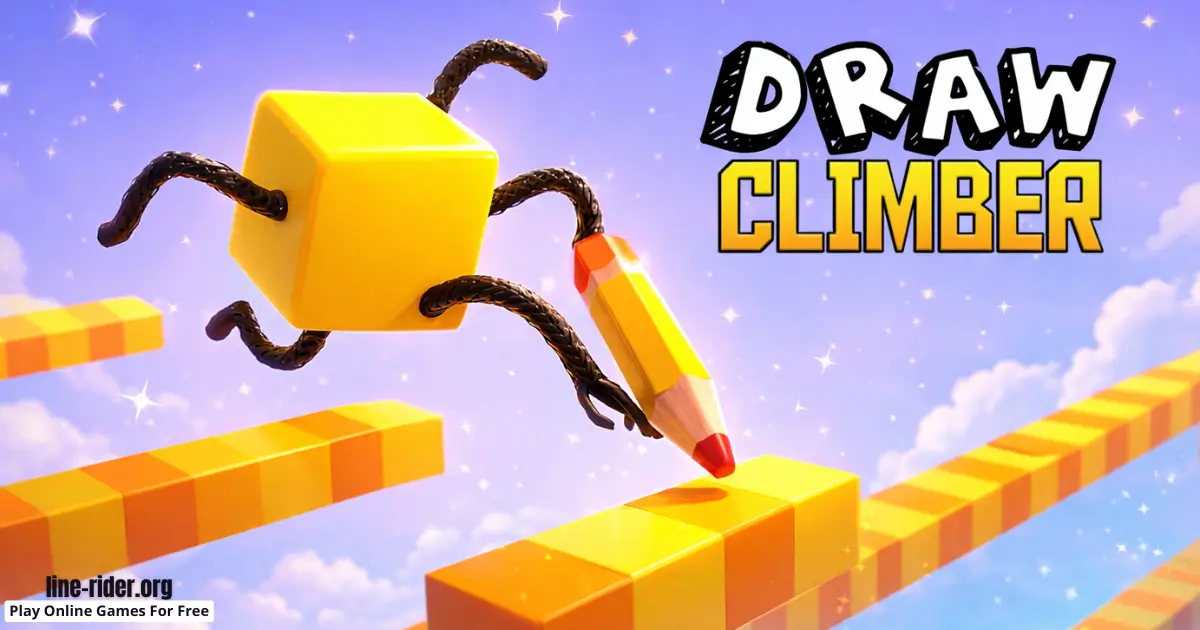
What is Draw Climber?
Draw Climber is an online browser video game that feels like doodling with a purpose. You are not drawing just to decorate the screen. You draw a simple shape, and that shape instantly becomes the "legs" for your character. That means your drawing is not just art, it is your control and your plan.
Every track throws small problems at you, like steps, bumps, steep slopes, or awkward little gaps. A long, tall shape can climb well, but it can wobble and flip when the ground is flat. A smooth, round shape can roll fast, but it may struggle when the track gets rough. The fun is in switching quickly and testing ideas until you find a shape that matches the next obstacle.
This also makes Draw Climber a great fit for Drawing and Draw-to-Solve game fans, because you solve movement problems by sketching the solution. If you want a simple reference page about the playable version, you can check this Draw Climber guide page.
Draw Climber Gameplay
The gameplay loop is quick: you move, you get stuck or slowed down, you redraw, and you immediately see the result. Some drawings act like long legs that step over ridges. Some act like a wheel that rolls smoothly. Others work best as short, sturdy "feet" that stop you from tipping over. The best runs come from swapping shapes on purpose instead of keeping one design for the whole level.
As you practice, you start building a tiny toolbox of shapes in your head. One might be your speed shape for flat ground. Another might be your climbing shape for stairs. A third might be your safety shape for bumpy sections where flipping wastes time. You do not need perfect drawings. Clean, simple shapes are usually stronger than messy scribbles.
Because rounds restart fast, experimenting feels friendly. If a shape fails, you learn something in seconds and try again. That is why this browser game is so easy to pick up for kids, but still fun to improve at over time.
Good shapes are usually wide enough to stay stable, but not so wide that they drag. Tall legs can climb, but they can also flip you over, so keep the bottom smooth and the sides balanced.
Tips: If you reach a staircase, draw two medium “U” legs instead of one giant shape, because it often climbs with less wobble.
Platform
You can play this game directly in your web browser on desktop, laptop, tablet, or mobile. No downloads are needed to start playing on this page.
How to Play Draw Climber
Goal: Reach the finish by drawing leg shapes that help your climber move through obstacles smoothly, without flipping or getting stuck.
- Start the race and look at what is coming next (flat ground, bumps, steps, slopes, or small gaps).
- Draw a simple shape and watch how it moves, then keep going while it works.
- When you slow down or tip over, redraw a shape that matches the obstacle you are facing.
- Keep both sides similar so your racer stays balanced and moves straight.
- Switch early when the terrain changes, because waiting until you are stuck usually costs time.
A helpful way to think is: what do I need right now, speed, height, or stability? On a smooth stretch, a rounder shape can help you roll faster. On stairs, you often need more height. On bumpy ground, shorter shapes can keep you steady. The game becomes much easier when you choose shapes for a reason instead of guessing.
Look a little ahead on the track and plan your next swap. If you spot stairs coming, you can switch to a climbing shape before you crash into the first step. If you spot a long smooth path, you can switch to a rolling shape early and keep that speed. This simple habit, look ahead, swap early, is one of the fastest ways to improve.
If you are playing on a small screen, draw shorter shapes at first. Big shapes can be hard to control with a finger, and messy lines often lead to bouncy movement. With practice, you will draw faster, and your shapes will feel more consistent.
Tips: When you see a long flat stretch, switch to a smoother rolling shape early so you build speed before the next obstacle.
Draw Climber Controls
Desktop: Use your mouse or trackpad to draw the leg shape on the screen, then release to apply it.
Mobile: Use your finger to draw on the screen, then lift to apply the shape.
Controls can feel slightly different depending on your device, but the idea stays the same: draw, test, and redraw quickly.
Draw Climber Tips and Tricks
- Start simple. Clean shapes are easier to control than complicated scribbles.
- Use gentle curves on flat ground to roll faster and bounce less.
- Redraw before you are fully stuck. Early changes save more time than late changes.
- For stairs, add height but keep balance. Too tall can flip.
- If you keep tipping over, shorten your shape and make the bottom smoother.
- On bumpy sections, choose shorter legs so you do not slap into every bump.
- Use symmetry. Matching left and right sides usually means smoother movement.
- On slopes, try a shape with a little more "foot" so you do not slide backward.
- Do not overdraw. Extra loops can create drag and slow you down.
- Keep a quick backup shape you can redraw fast without thinking.
- After a flip, go smaller first to regain stability, then speed up again.
- If a shape is almost working, change one small part instead of drawing something totally new.
- Use a slightly wider shape if you keep wobbling side to side.
- If you are crawling too slowly, try rounding the bottom more to reduce drag.
- On tiny gaps, focus on stability first, because falling wastes more time than going a bit slower.
- When you find a shape that works, reuse it later instead of redesigning from scratch.
Tips: Make three go-to shapes, one for speed, one for climbing, and one for tricky bumps, and swap between them instead of inventing a brand-new idea every second.
Draw Climber Common Mistakes to Avoid
- Mistake: Drawing huge legs every time. Fix: Start medium, then go bigger only when you truly need height.
- Mistake: Making one side longer than the other. Fix: Draw a simple mirrored shape to stay balanced.
- Mistake: Using sharp corners that snag on edges. Fix: Round the bottom so it slides past corners more easily.
- Mistake: Waiting too long to redraw. Fix: Switch as soon as you see the terrain change.
- Mistake: Keeping a tall shape on flat ground. Fix: Switch to a lower rolling shape for speed and stability.
Tips: If you lose a run, remember what caused the flip, then redraw a simpler, lower version of your last shape.
Draw Climber Features
- Drawing-based movement where your sketch directly changes speed and climbing.
- Fast feedback loop: draw, test, and adjust in seconds.
- Obstacle-focused tracks that keep you switching strategies.
- Easy-to-learn concept that still rewards smart timing.
- Quick restarts that make experimenting feel fun.
- Works well for short sessions because rounds move quickly.
- Kid-friendly gameplay that focuses on creativity and problem-solving.
- Browser play on many devices, with no install required to start here.
Even though the controls are simple, the game has a nice skill curve. You will feel yourself improving as your drawings get cleaner, your swaps get faster, and you learn which shapes match which obstacles. That "I figured it out!" feeling is the reward.
If you want to improve, replay a level and change just one thing each run. This simple practice helps you learn faster and makes your best shapes feel automatic sooner today.
Draw Climber Download
Want to enjoy Draw Climber more comfortably on your device? Here’s how:
For Draw Climber on iOS (iPhone or iPad)


Draw Climber Unblocked
You do not need to search “Draw Climber unblocked” to play here, because our website does not block access. If you are on a school or work network, always follow the rules and play only when it is allowed.
This is a great pick for a quick break, because you can test a new drawing idea in seconds and restart fast if it flops.
No need to search for Draw Climber unblocked 76, Draw Climber unblocked 66, Draw Climber Poki, Draw Climber Cool Math Games, Draw Climber Math Playground, Draw Climber Crazy Games, Draw Climber Classroom 6x, or Draw Climber 2 Player Games.
The updated, fully working version is available right here on Draw Climber and you can play for free anytime on most devices and networks.
Draw Climber Github
No need to search for a Draw Climber Github version. You can play Draw Climber directly on our website in your browser.
Play Draw Climber Online for Free
You never have to pay to play Draw Climber on our website. Just open the game in your browser and enjoy free play anytime.
Is Draw Climber Safe for Kids?
- It is a browser game with simple, non-violent gameplay focused on drawing and racing.
- The challenge is about timing and experimenting, not scary or intense content.
- Short rounds make it easier to stop after an attempt and take breaks.
- Stick to the game page and avoid clicking random pop-ups elsewhere online.
- On shared devices, do not share personal info on any outside pages.
- Parents can set a simple time limit so play stays fun and balanced.
(Parent note: If a child gets frustrated, remind them that the point is to test ideas. One small redraw can change everything.)
Why You'll Love Draw Climber game
- Your doodle becomes real movement, so every try feels creative.
- You can improve fast by learning a few smart shapes.
- It is satisfying to swap shapes at the perfect moment and zoom ahead.
Draw Climber Details
Requirements
To play this game, all you need is a computer, an internet connection, and a web browser. No downloads are required!
Release Date
March 2025
Developer
Developer: Voodoo.
Platform
Web browser (desktop and mobile)
Technology
Built using modern web technology for browser play (exact tech is not listed on this page).
Similar Games to Draw Climber
If you're a fan of Drawing Games, you'll definitely enjoy these too:
- Line Rider
- Doodle Road
- Car Drawing Game
- Skribbl.io
- Love Balls
- Draw One Line
Drawing Games
Drawing games let you use lines and shapes to do something, not just make a picture. You might sketch paths, trace patterns, or draw quick solutions that change the action right away. They are great for short browser sessions because you can start fast, test an idea, and try again. If you want more games where your drawings matter, visit our Drawing Games collection.
Draw-to-Solve Games
Draw-to-solve games turn your drawing into the answer. You solve problems by sketching the right line, bridge, or shape so the level works in your favor. These games often use physics, balance, and timing, so small changes can create big improvements. Try more creative challenges in our Draw-to-Solve Games category.
FAQ
Is Draw Climber free to play in my browser?
Yes, Draw Climber is free to play on our website. You can open it in your web browser and start playing right away.
Do I need to download anything to play Draw Climber here?
No download is needed for the browser version. Just load the game page and play.
What do I draw in Draw Climber?
You draw a leg shape that changes how your climber moves. Different shapes can help with rolling speed, climbing, or staying stable.
What is the best shape in Draw Climber?
There is no single best shape for every track. A round shape can be great for flat ground, while taller shapes often help on stairs. Many players keep a few simple shapes and swap when the terrain changes.
Why does my climber keep flipping over?
Your shape is probably too tall, too long, or uneven. Try a shorter, more symmetrical shape with a smooth bottom.
Why do my legs get stuck on edges?
Sharp corners and very long legs can snag. Try rounding the bottom and making the shape a little shorter so it slides past corners.
Is Draw Climber a puzzle game or a racing game?
It is a racing game with puzzle moments. You "solve" obstacles by drawing the right shape at the right time.
Can I play Draw Climber on mobile?
Yes, many phones and tablets can run it in a mobile browser. If you want an app version, use the official store links in the Download section.
Can I play Draw Climber at school?
Yes, if your school allows it. Always follow school rules and play only during approved free time.
What should I do if Draw Climber is not loading?
Refresh the page first. If it still does not load, try a different browser, disable heavy extensions, or close extra tabs.
Does Draw Climber save progress?
Progress can vary by version and device. In a browser game, it is best to enjoy quick runs you can replay anytime.
Is Draw Climber single-player?
On this page, you focus on your own runs and improve by switching shapes faster and drawing cleaner legs.
How can I make Draw Climber run smoother on an older device?
Close extra tabs and background apps, then refresh the page. If you are on mobile, lowering other apps running in the background can help.
Where can I learn more about the game?
You can read a simple reference page on this learn what Draw Climber is page. For the publisher’s main site, you can also visit the official site.
Conclusion
Draw Climber is a quick, creative browser game that turns your sketches into movement. When you learn how to swap shapes at the right time, it becomes a fun speed puzzle you can replay again and again.
Open the game, draw your best legs, and race to the finish now.